

Oracle Database 23ai is introducing many new features over the Release Updates.
Most of those changes can be tracked via https://docs.oracle.com/en/database/oracle/oracle-database/23/nfcoa/release_updates.html . However, not all of them are documented, and sometimes, I find interesting stuff on https://oradiff.oracle.com, like this one:
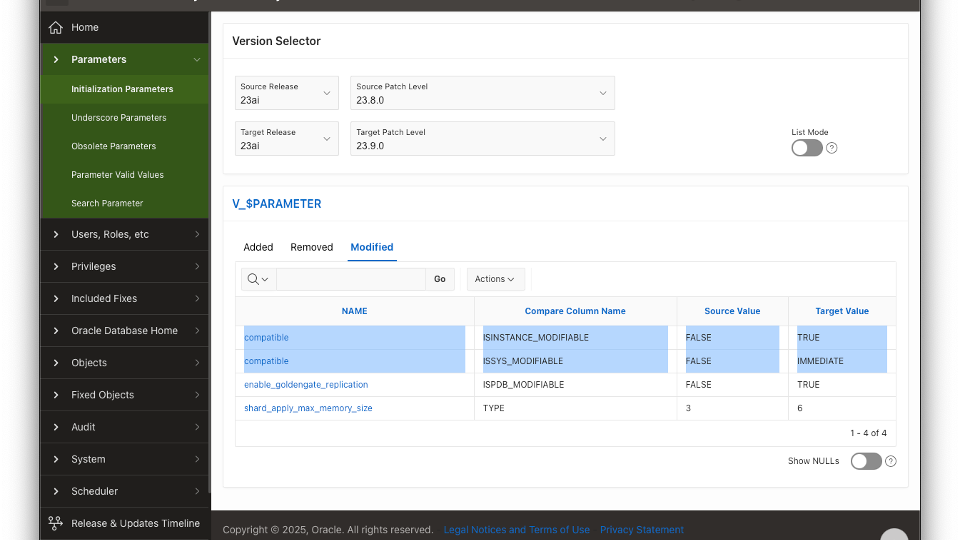
As we can see, the COMPATIBLE parameter is now instance modifiable and ISSYS_MODIFIABLE has changed to IMMEDIATE, which means that the change takes effect immediately.
Interesting! To make life easier for customers and eliminate the need to bounce instances when raising the COMPATIBLE setting (to take advantage of some new features), Oracle has removed this requirement.
Let’s test it!
[oracle@oradiff-23-0-0-0 ~]$ sqlplus / as sysdba

SQL*Plus: Release 23.0.0.0.0 - for Oracle Cloud and Engineered Systems on Fri Aug 1 19:46:03 2025
Version 23.9.0.25.07

Copyright (c) 1982, 2025, Oracle.  All rights reserved.


Connected to:
Oracle Database 23ai Enterprise Edition Release 23.0.0.0.0 - for Oracle Cloud and Engineered Systems
Version 23.9.0.25.07

SQL> show parameter compatible

NAME				     TYPE	 VALUE
------------------------------------ ----------- ------------------------------
compatible			     string	 23.0.0
noncdb_compatible		     boolean	 FALSE

SQL>
Let’s try to change it using ALTER SYSTEM:
SQL> ALTER SYSTEM SET COMPATIBLE = '23.5.0';
ALTER SYSTEM SET COMPATIBLE = '23.5.0'
*
ERROR at line 1:
ORA-02097: parameter cannot be modified because specified value is invalid
ORA-29427: The COMPATIBLE parameter can only be modified by the ALTER DATABASE
SET DOWNGRADE COMPATIBILITY command.
Help: https://docs.oracle.com/error-help/db/ora-02097/
It failed with:
“The COMPATIBLE parameter can only be modified by the ALTER DATABASE SET DOWNGRADE COMPATIBILITY command”
This is a brand new ORA error. Let’s try to change using ALTER DATABASE then..
SQL> ALTER DATABASE SET DOWNGRADE COMPATIBILITY TO '23.6.0';

Database altered.

SQL> show parameter compatible

NAME				     TYPE	 VALUE
------------------------------------ ----------- ------------------------------
compatible			     string	 23.6.0.0.0
noncdb_compatible		     boolean	 FALSE

SQL> ALTER DATABASE SET DOWNGRADE COMPATIBILITY TO '23.7.0';

Database altered.

SQL> show parameter compatible

NAME				     TYPE	 VALUE
------------------------------------ ----------- ------------------------------
compatible			     string	 23.7.0.0.0
noncdb_compatible		     boolean	 FALSE

SQL> ALTER DATABASE SET DOWNGRADE COMPATIBILITY TO '23.9.0';

Database altered.

SQL> show parameter compatible

NAME				     TYPE	 VALUE
------------------------------------ ----------- ------------------------------
compatible			     string	 23.9.0.0.0
noncdb_compatible		     boolean	 FALSE
Nice! Please note that once we raise the COMPATIBLE option, we cannot go back.
Also, if you try to move forward to a release higher than the current release, you get an error:
SQL> ALTER DATABASE SET DOWNGRADE COMPATIBILITY TO '23.0.0';
ALTER DATABASE SET DOWNGRADE COMPATIBILITY TO '23.0.0'
*
ERROR at line 1:
ORA-29421: ALTER DATABASE SET DOWNGRADE COMPATIBILITY command is specifying a
compatible value string with release number earlier than 23.9.0.0.0.
Help: https://docs.oracle.com/error-help/db/ora-29421/

SQL> ALTER DATABASE SET DOWNGRADE COMPATIBILITY TO '23.10.0';
ALTER DATABASE SET DOWNGRADE COMPATIBILITY TO '23.10.0'
*
ERROR at line 1:
ORA-29422: ALTER DATABASE SET DOWNGRADE COMPATIBILITY command is specifying a
compatible value string with release number later than 23.9.0.25.07.
Help: https://docs.oracle.com/error-help/db/ora-29422/
Now you can, in one simple command, enable some of the new features that requires COMPATIBLE changes (like some of the VECTOR features).
Have you enjoyed? Please leave a comment or give a ?!







1 comment
Author
Test