

In this article I will show how to change the RMAN configuration when you are connect inside an Oracle DB, using the package DBMS_BACKUP_RESTORE and its procedures. Modifying those RMAN attributes is an easy task when you are connected via Oracle RMAN utility. You can simply use the CONFIGURE syntax to change it. However, what a few people know …
Dec 22
Creating ROLE for DBaaS in Oracle Enterprise Manager Cloud
Creating a ROLE for DBaaS in Oracle Enterprise Manager Cloud is necessary for some tasks like when you want to setup DBaaS quotas. Quota is not required for initial set up but users would have no restrictions by default. When you open the “Create New Quota” screen, you will notice that no role is shown. Also, if …
Dec 15
Oracle Enterprise Manager 12c is not showing DBaaS option
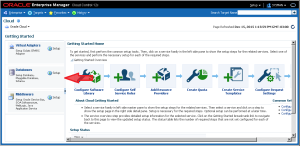
When you open the Cloud menu inside Oracle Enterprise Manager (Enterprise -> Cloud -> Cloud Home) and than go to the “Getting Started” page (Oracle Cloud -> Setup -> Getting Started), it can happen the the option to setup Databases is not presented there, like below: The problem when this icon does not appear is that the necessary …
Dec 08
How to apply PSU in multiple Oracle Databases simultaneously using the Enterprise Manager 12c
In this tutorial, I will show how to apply PSU in multiple Oracle Databases simultaneously using the Enterprise Manager 12c. This is a very useful feature available specially when you have tens or hundreds of databases in your EM and you want to patch them all without the need to do it one by one. …
Nov 25
EM Patch apply failing with: Prereq “checkActiveFilesAndExecutables” is not executed
Those days, when trying to apply Database Patches using the Oracle Enterprise Manager 12c, I was getting an error: Prereq “checkActiveFilesAndExecutables” is not executed. Invoking prereq “checkactivefilesandexecutables” Prereq “checkActiveFilesAndExecutables” is not executed. The details are: No patch location specified. OPatch failed with error code 2 ERROR: Failed to invoke ‘opatch prereq checkActiveFilesAndExecutables’ ERROR: Some processes …